

Creating A/B Test Campaigns
Premium Feature
A/B testing is available exclusively with Premium plans. To unlock this feature, go to Settings, then Plans & Billing to upgrade your plan.
Description
An A/B test (split test or bucket test) compares two campaign versions to determine which performs better. The statistics of each email version are compared, and our application makes a decision based on click rates. In other words, we handle this process to determine the best email variation for you.
Why It's Important
Ultimately, a well-planned A/B test can have a significant impact on your marketing results. It's possible to create a more robust marketing plan by refining and combining the most effective elements of a promotion. This will result in higher return on investment, lower failure risk, and, most importantly, a more robust marketing campaign.
Step-by-Step Instructions
Remember that you need to have a sample big enough to perform an A/B test since it will trigger on the most clicked sample A or B of your test distribution. If you have a very small list and your campaign is time sensitive, it's not a good tool to use. Evaluate how long it can take to reach X number of clicks necessary and do the math.
To create an A/B test, follow these simple steps:
-
In the left menu, select Campaigns, then A/B Test.
-
On this new page, you can click on the + to start a new campaign.
-
Name your A/B test and select a list and segment. When you're done, click Continue to proceed to the next step.
-
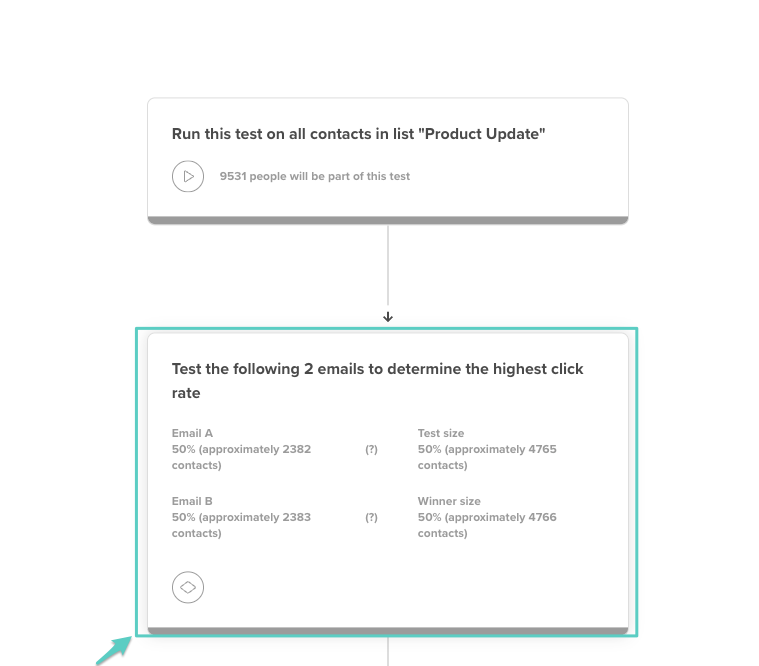
In the Edit A/B Test page, select the second block to open its settings.
-
You can now set the A/B test distribution settings on the left side of the screen.
-
By default, emails A and B are split 50/50.
-
The test distribution size and winner email can be set.
-
With a distribution size of 40% and winner email size of 60%, 60 percent of all contacts will receive the email that performed better in the 40% sample.
-
-
You can also adjust the settings to select winners.
- Decide when you want this test to end, and set an email to send if no winner is found. If no clear winner can be determined due to lack of statistical significance, an email will be sent to this email.
-
Back in the A/B test creation flow, select the Email A block to open its settings.
-
On the left side of the screen, click Edit to modify the email.
-
If you want to reuse this content in the second email and add variations, edit the email and click Copy Email A Content to B.
-
Click Save and Exit when you're done.
-
Follow the same procedure to edit Email B.
-
When you're satisfied with the email variations and ready to start the test and launch the campaign, click Start Test in the top right corner of the screen.
Your test creation is now complete! You can find it in the A/B test drafts and analyze its results.
You can also rename, delete, or duplicate the test by clicking the downward arrow.
Troubleshooting
A/B testing not available
- Check that you have a Premium account with A/B testing enabled
- Contact support to upgrade your plan if necessary
- Verify your list has enough contacts for meaningful testing
Inconclusive test results
- Increase the test sample size (minimum 1000 contacts recommended)
- Extend the test duration to allow more engagement time
- Ensure variations are different enough to produce measurable results
Winner selection issues
- The winner is determined by click rate (the version with the higher click rate wins)
- Set a fallback email in case no statistical winner emerges
- Allow at least 4-6 hours for meaningful engagement data
Distribution problems
- Check that test/winner split totals 100%
- Verify segments don't overlap between test groups
- Ensure all contacts in the list are active and deliverable
Content copying doesn't work
- Save Email A before attempting to copy to Email B
- Clear browser cache if copy function fails
- Manually recreate content if technical issues persist
Related Articles
- Testing Your Campaign - Pre-send testing
- Understanding Campaign Reports - Analyzing test results
- Creating Subject Lines with AI - Testing subject lines
- Creating Campaigns - Campaign basics
- Understanding Open Rates - Measuring test success