

Tracking and Bounce Domains
Why this matters
Once your domain is authenticated, we strongly recommend aligning two more things on your domain: your tracking domain and your bounce domain.
This is not mandatory, but strongly recommended, because it:
- Brands your links with your own domain. All the clickable links in your campaigns are routed through a tracking domain. Aligned, they begin with your domain instead of a generic one, which looks more trustworthy and helps deliverability.
- Handles your bounces properly. The bounce domain receives delivery-status notifications for emails that bounce, which keeps your audience clean. Recipients never see it unless they inspect the email headers.
- Makes your test links work. Links in test emails only stay active longer once your tracking links are validated. See My test email links are not working.
Before you start
Like domain authentication, this is done in your domain's DNS settings (at your registrar or hosting provider). You'll add two CNAME records using the exact values the platform shows you.
Set up tracking and bounce alignment
-
In the left menu, go to Settings ▸ Domains.
-
Scroll to Tracking and Bounce domain alignment and select your Domain from the dropdown.
-
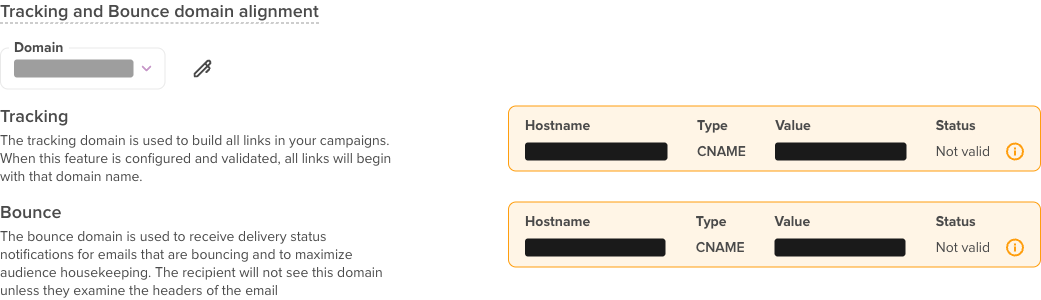
The platform shows two records to add in your DNS, a Tracking record and a Bounce record:
- Type:
CNAME - Hostname and Value: copy the exact values shown for your domain (the hostnames look like
link.yourdomain.comandem.yourdomain.com).
- Type:
-
Add both
CNAMErecords in your DNS provider, exactly as shown. -
Wait for propagation (usually a few hours, up to 24–48 hours), then come back. Each record's Status changes from Not valid to valid once the platform detects it.
What each one does
- Tracking domain: builds all the links in your campaigns. When configured and validated, all your links begin with your domain name.
- Bounce domain: receives delivery-status notifications for bouncing emails and helps keep your audience clean. The recipient won't see this domain unless they examine the email headers.
Troubleshooting
A record still shows "Not valid"
- Re-copy the Hostname and Value exactly; don't retype them.
- Make sure the record Type is
CNAME. - Allow up to 24–48 hours for DNS propagation, then check again.
- If it still won't validate, contact our Support team.
Related articles
- Authenticating your domain - Do this first
- My test email links are not working - Test link validity
- Adding a sender - Set up your "From" address
- Mastering deliverability basics - Improve inbox placement