

Tracking Click Rate Activity
Description
You can track click performance by URL to get additional details about which of your contacts clicked on which links in your campaign. You can also monitor how many times they clicked on the link as well as when and on what type of device.
Why This Matters
Additional details about your click rates in your campaigns will allow you to analyze these contacts individually. You can then use this data to create segments, for example, to send targeted campaigns to interested parties. Here's how to create dynamic segments.
Step-by-Step Process
Sent Campaign
-
In the left menu, select Campaigns, then Emails.
-
Click View Report on the sent campaign you want to evaluate.
-
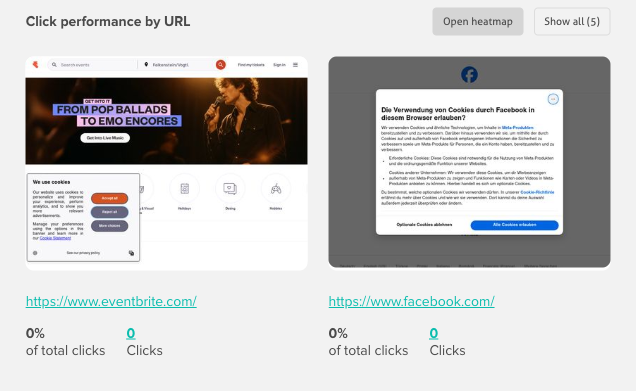
On the Performance tab, scroll to Click performance by URL to see how many clicks each link received.
-
Click Show all to expand the full list of links.
-
Use Open heatmap to see where people clicked within the email.
-
To see who clicked, select the Contact activity tab, then the Clicked filter. Optimize your email marketing strategy by taking this information into account and you will get better results.
Troubleshooting
No click data displayed for links
- Check that link tracking is enabled in your campaign settings
- Verify links are properly formatted (must start with http:// or https://)
- Ensure links don't redirect through third-party shorteners that block tracking
- Test links in preview mode before sending the campaign
Click counts don't match landing page analytics
- Email click tracking and website analytics may use different counting methods
- Check for bot clicks from security scanners (unusually high click rates immediately after sending)
- Examine if multiple redirects cause tracking discrepancies
- Consider time zone differences between platforms
Unable to export click activity data
- Check that you have necessary account permissions for data export
- Verify if there's a limit on the number of records you can export
- Try exporting smaller date ranges if dealing with large datasets
- Ensure your browser allows file downloads from the platform
Related Articles
- Understanding email click rates - Click rate benchmarks
- Creating UTM tracking links - Enhanced click tracking
- Tracking campaign performance - Overall campaign analytics
- Adding a video to a campaign - Engaging content for clicks
- Understanding campaign reports - Complete metrics guide